
For accounting firms · CHF 0
Your clients supply the receipts. You do the accounting.
Buchsnap is free for accounting firms (Treuhänder). Your clients send receipts as photos, uploads or emails. You get draft entries and work in a journal that's as fast as Banana.
We check every sign-up manually and usually activate your firm within one working day.

Sound familiar?
The folder arrives in February. Half of it is missing.
Receipts arrive in envelopes, as photos on WhatsApp and as PDFs spread across five different emails. Before you can post anything, you have to sort it all. And in March you ask for the August fuel receipt for the third time.
Buchsnap changes the order: each receipt arrives as soon as it's issued and is already in the right month, with a suggested entry.

How your office works
Your day with Buchsnap
- 1
Check the inbox
New receipts from all your clients appear with a draft: the date, amount, VAT rate and supplier have already been read.
- 2
Approve or correct
If the suggestion is right, approve it. If not, change the account. In the journal, Buchsnap suggests the most recently used accounts for familiar entry descriptions.
- 3
Reconcile the bank
Import camt.053/054 files and match payments. TWINT, Worldline, SumUp and Uber come in as CSV files; Stripe, SumUp and Wallee via API.
- 4
Close the period
Create the VAT report, lock the period and move on to the next client. If something is missing, the client gets a task with a deadline.
 Enlarge ↗
Client overview
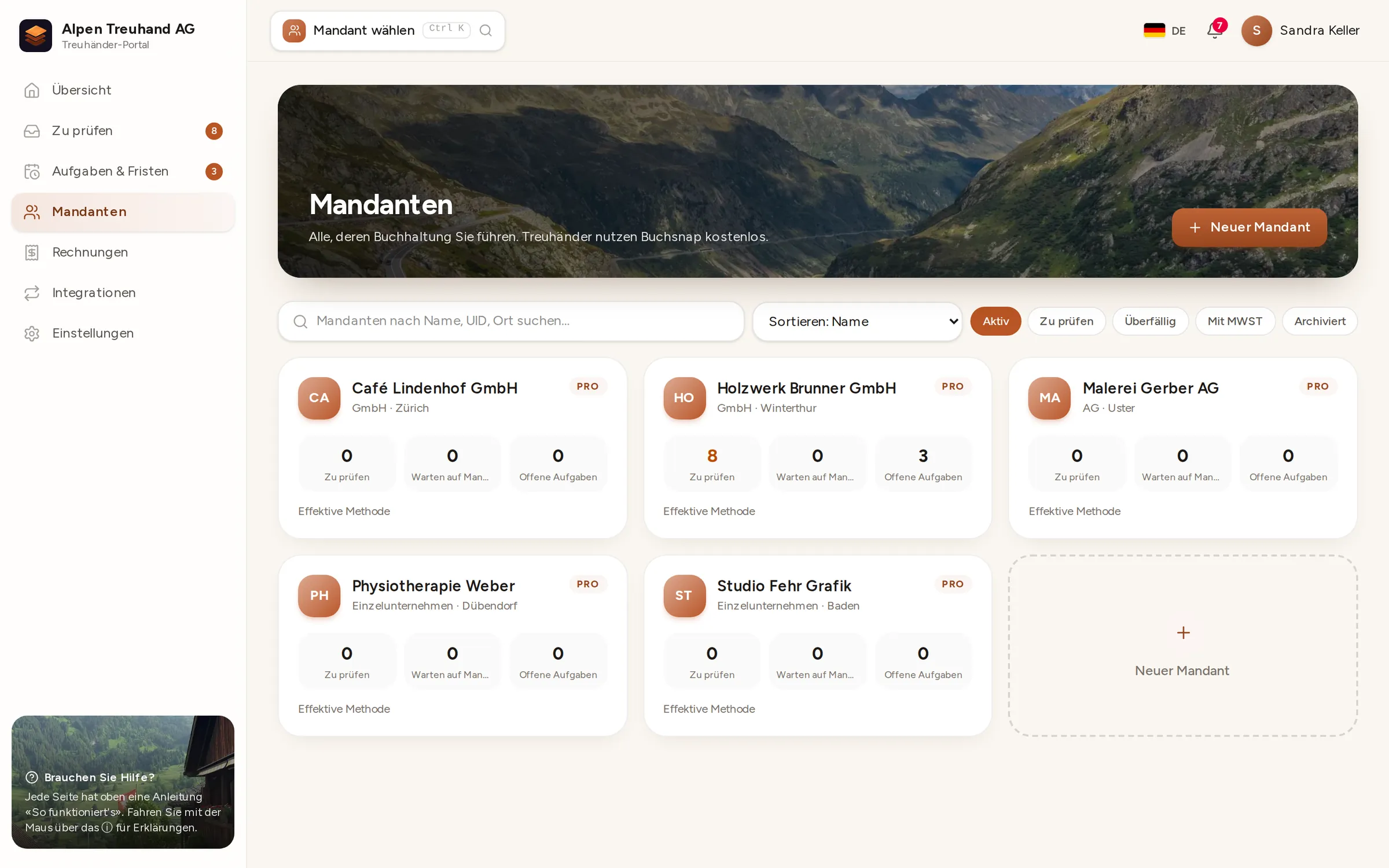
All your clients on one page
Each client is a tile showing legal form, plan, new receipts, open tasks and queries. Filter by plan or status, or search by name or UID. Press Ctrl + K to jump straight to any client from anywhere.
- 1Add a new clientName, legal form, VAT method and the owner's email address. Buchsnap sets up the Swiss SME chart of accounts (Kontenrahmen KMU) and creates the client's login.
- 2Choose a planBASIC, PLUS or PRO, depending on what the client should see and do themselves.
- 3Get to workClick a tile to open that client's receipts, accounts, VAT and tasks.
 Enlarge ↗
Checking receipts
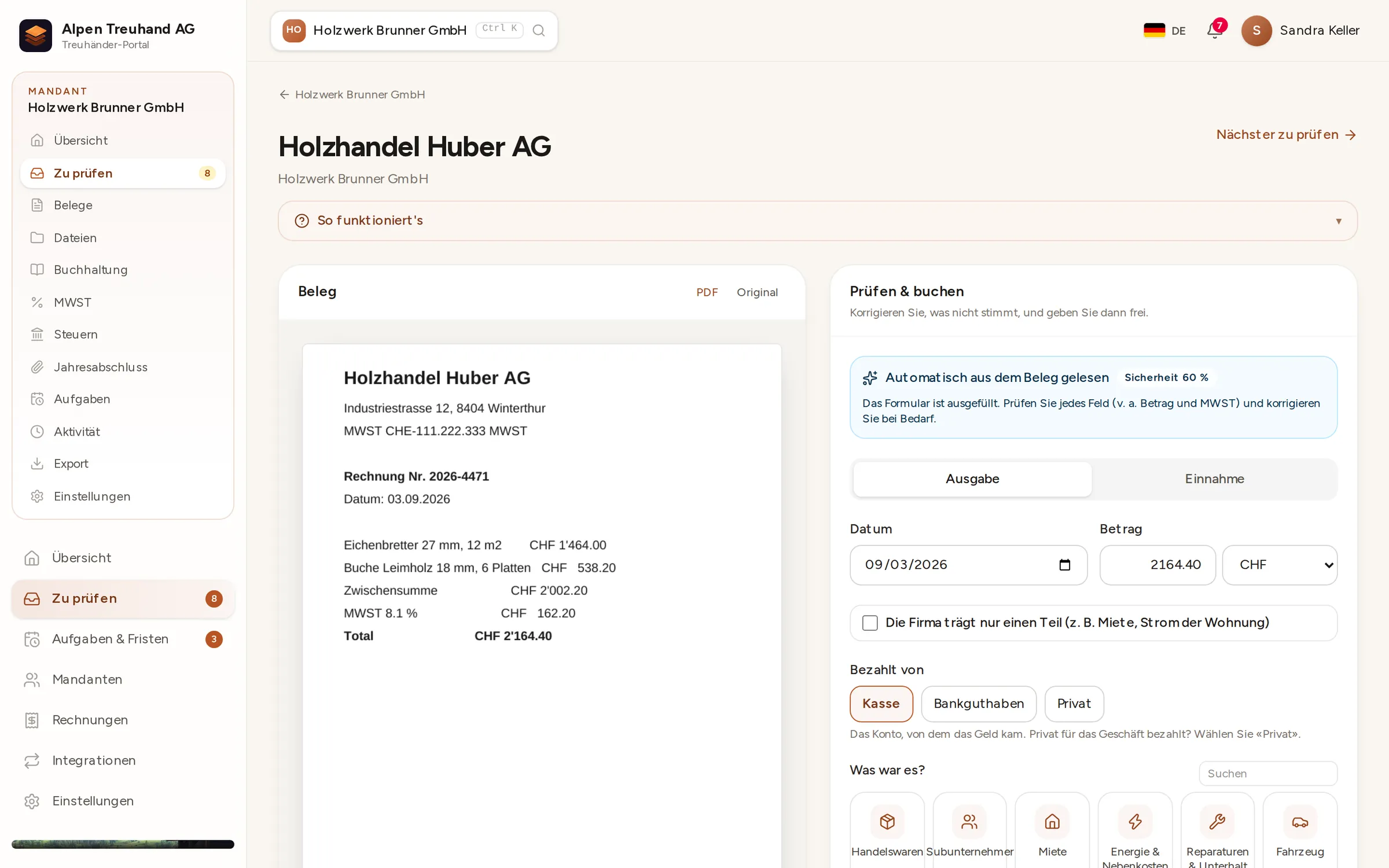
Receipt on the left, draft entry on the right
Each receipt opens next to a pre-filled form: the supplier, date, amount and VAT are read from the receipt, and for QR-bills the account and reference as well. You check it, choose the account and approve.
- 1RecognisedBuchsnap reads text and QR codes on its own server and shows how confident the recognition is.
- 2CorrectChange the amount, date or account if necessary. Categories are labelled in everyday language, with the account shown behind them.
- 3ApprovePosted with one click. "Next to review" takes you straight to the next receipt.
 Enlarge ↗
Journal
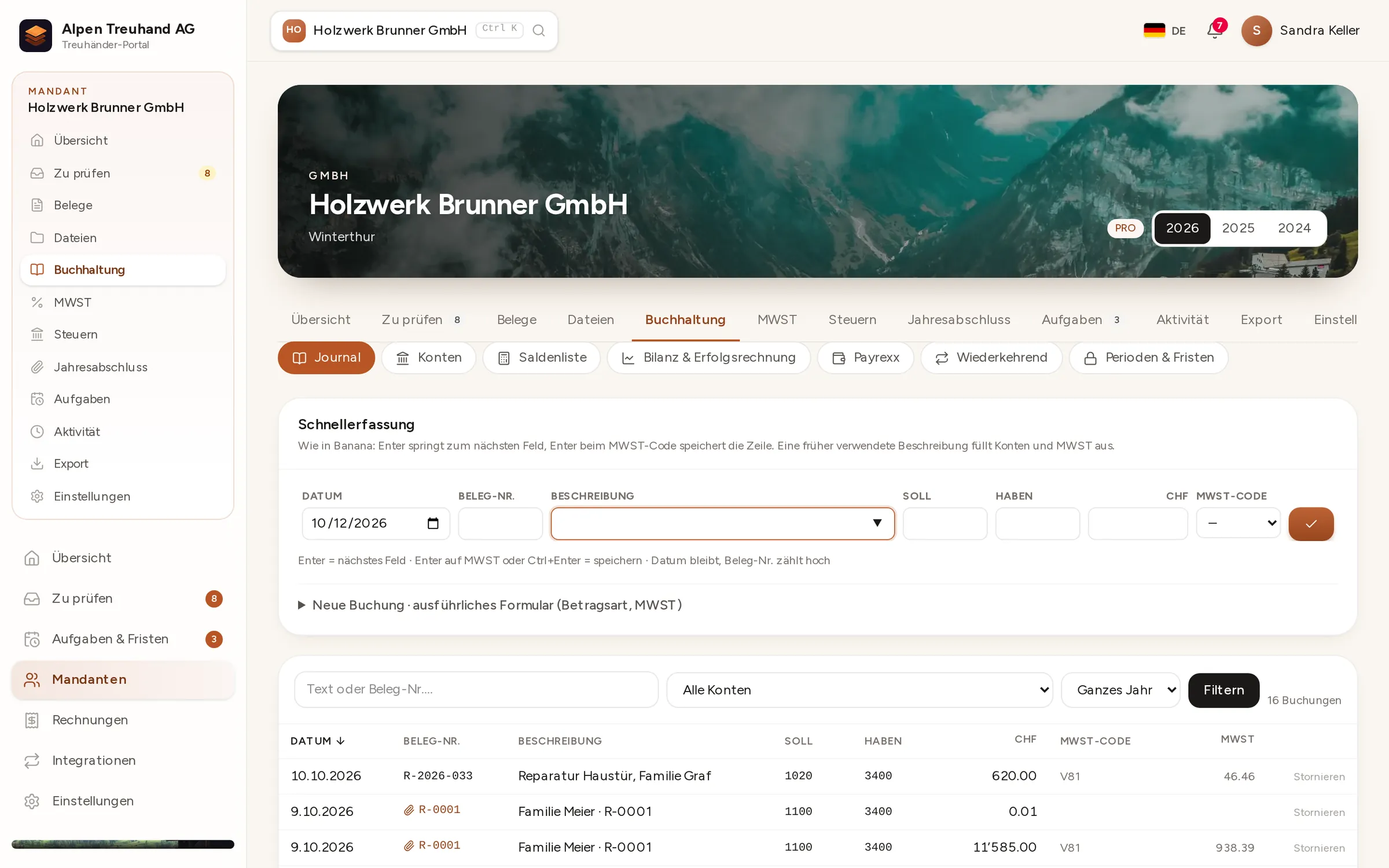
Post from the keyboard, just like in Banana
The journal is made for people who post a lot: Enter moves you along the row, the receipt number counts up by itself, and for familiar entry descriptions Buchsnap fills in the accounts and VAT code.
- 1Quick entryDate, receipt, description, debit, credit, amount, VAT code. Press Enter in the last cell to save.
- 2Memory"Workshop rent" fills in 6000 to 1020, every time.
- 3Filter and exportFilter by account, period or text, and export to Excel or for Banana.
 Enlarge ↗
VAT
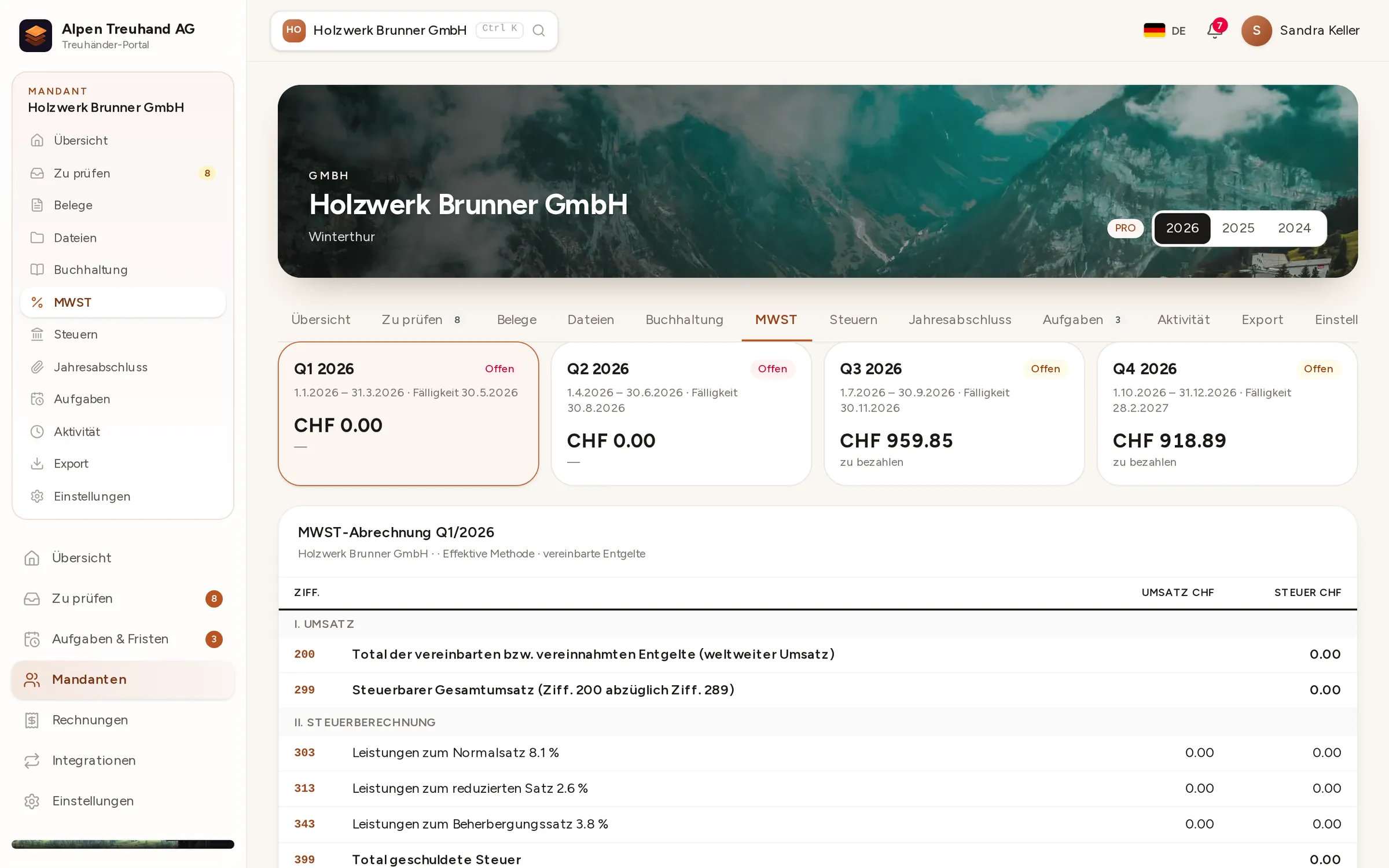
The VAT return, box by box
For each quarter or half-year, Buchsnap shows the amounts by box number on the Swiss Federal Tax Administration (FTA/ESTV) form, for both the effective method and the net tax rate method (Saldosteuersatz). Once you've filed, lock the period so that nobody can change anything.
- 1Periods at a glanceEvery quarter with its due date, amount and status: "open" or "filed".
- 2Form box numbersTurnover, deductions, tax and input tax exactly as you enter them in the FTA's ePortal.
- 3LockA locked period accepts no further entries.
 Enlarge ↗
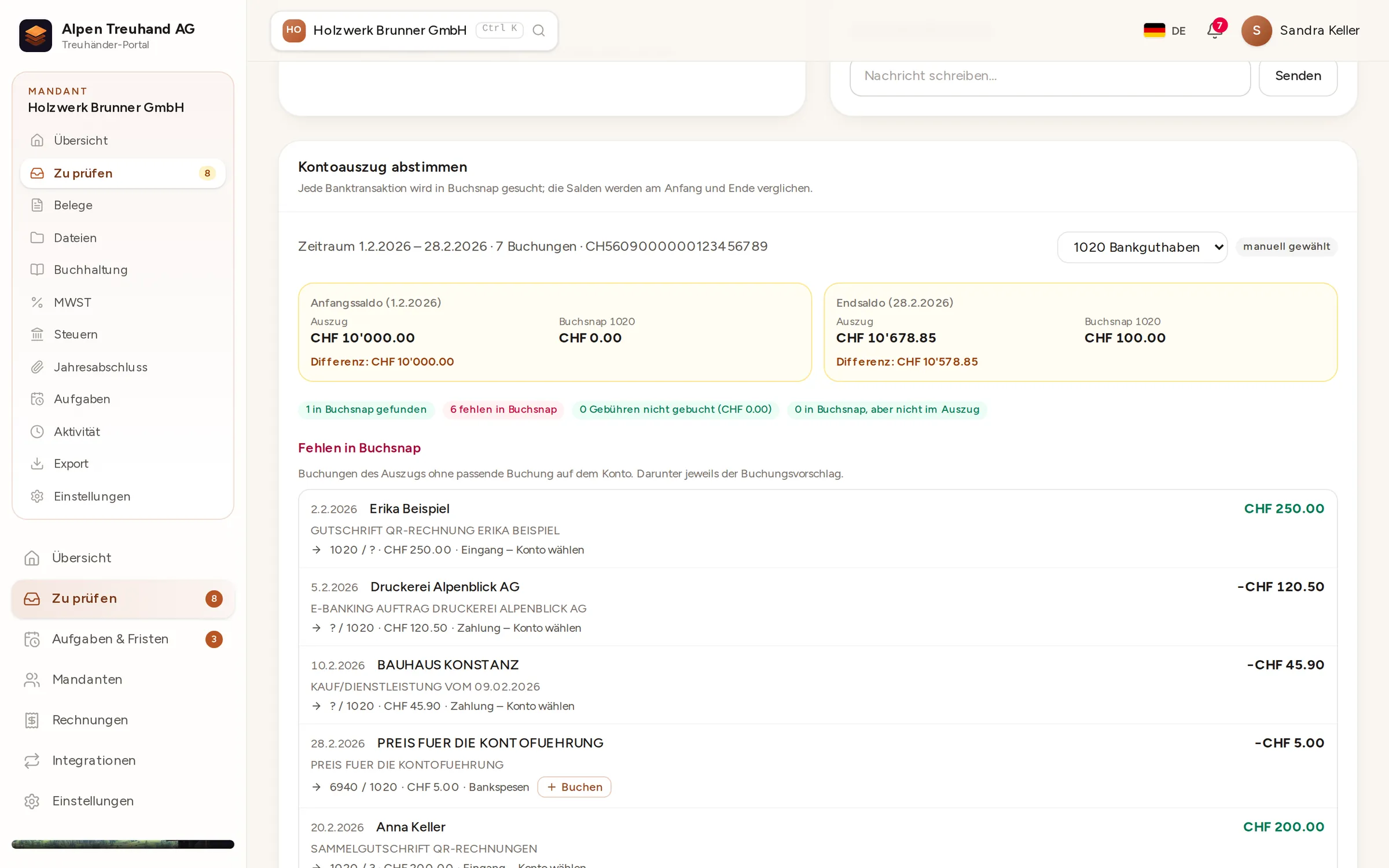
Bank reconciliation
Upload a bank statement and spot gaps instantly
Upload the camt.053 statement from e-banking and choose the bank account. Buchsnap compares the opening and closing balances, finds every payment in the accounts and shows what is still missing, each with a suggested entry.
- 1BalancesThe statement's opening and closing balances alongside the balance in Buchsnap, with the difference.
- 2Found and missingPayments that have already been posted are recognised, and missing ones are listed individually.
- 3Post with one clickPost bank charges and familiar contra accounts straight from the suggestion.
 Enlarge ↗
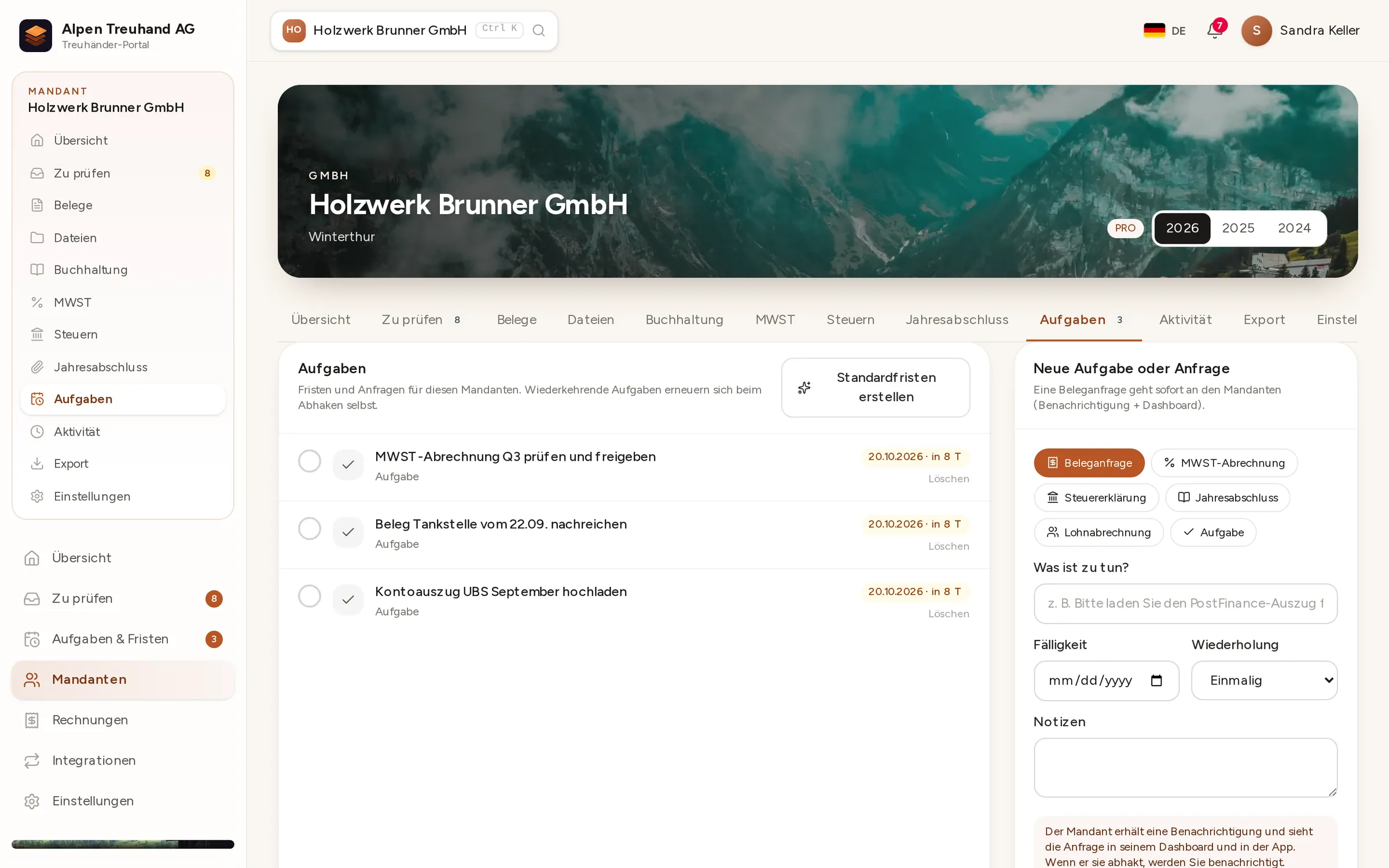
Tasks
Queries with deadlines instead of email ping-pong
If a bank statement or receipt is missing, create a task with a deadline. The client sees it in their dashboard and as a push notification in the app, and can upload the receipt right there.
- 1Create a taskTitle, type and deadline, and recurring if you like, such as the bank statement every month.
- 2Standard tasksGenerate the usual annual tasks for a new client in one click.
- 3DoneThe client delivers, you see it straight away and the task is ticked off.
Accountant portal
What's in the portal
Client overview
All your clients on one page, with outstanding receipts, tasks and deadlines.
A journal built for volume
Keyboard control, templates and the Swiss SME chart of accounts. If you know Banana, you'll feel at home straight away.
VAT per client
Effective method or net tax rate, reports per period and period locking.
Foreign currencies
Conversion at the official exchange rates of the Federal Office for Customs and Border Security (FOCBS/BAZG), right as you post.
Closing and export
Balance sheet, income statement, year-end closing pack, export to Banana and a ZIP archive for each year.
Your brand
Client portal and app with your logo and colours. Your clients see your firm.
Who pays for what
You pay nothing. Your fees stay yours.
Your accountant account is free, however many clients you look after. Your clients take out a subscription: BASIC CHF 29, PLUS CHF 59 or PRO CHF 99 a month, excluding VAT. Your own work isn't included. You invoice it directly, just as before.
The plan only determines what the client sees in their dashboard. You work with every feature on every plan.
- BASIC covers receipt capture and the journal
- PLUS for VAT-registered clients who issue their own invoices
- PRO for point of sale, payment providers and online shops

Switching over
You don't have to switch everything at once.
Start with two or three clients
Start with the clients whose receipts currently take the most time to collect. The others can follow once it has proved its worth.
Banana still works
If you'd rather keep closing the year in Banana, export the entries there. That way your usual workflow stays exactly as it is.
Your whole team
Invite your staff as administrators or accounts clerks. Everyone gets their own login and, if they wish, two-factor authentication.
Sign-up
Up and running in three steps
- 1
Fill in the form
Your firm, a contact person and the languages you speak. It takes about three minutes.
- 2
Confirm your email
We check your details and activate your account, usually within one working day.
- 3
Get going
Upload your logo, then add and invite your first client.
FAQ
Questions from accountants
What does Buchsnap cost my accounting firm?
Why is my sign-up checked manually?
Do I see every feature even if my client only has BASIC?
Can I keep working in Banana?
How reliable is receipt recognition?
Can my staff use it too?
What happens if a client switches accountant?
Try it with your next client.
Free, with no contractual commitment for your firm.